

Snowflake to DuckDB Migration
This guide covers the key differences between Snowflake and DuckDB SQL dialects and provides practical advice for migrating your Snowflake transformations to DuckDB in Keboola.
Automatic SQL Transpilation
Section titled “Automatic SQL Transpilation”SQLGlot can automatically convert approximately 85% of Snowflake SQL syntax to DuckDB. However, some constructs require manual adjustment. The sections below cover the most common differences you will encounter.
You can also use the Kai AI assistant in Keboola to help with migration.
Transformation Migration Component
Section titled “Transformation Migration Component”Keboola provides an experimental Transformation Migration component (keboola.app-transformation-migration) that automates
the migration of Snowflake transformations to DuckDB. The component handles SQL dialect translation, preserves input/output
table mappings, and creates new DuckDB transformation configurations automatically.
Tutorial: Migrating Snowflake Transformations
Section titled “Tutorial: Migrating Snowflake Transformations”Step 1: Create a New Configuration
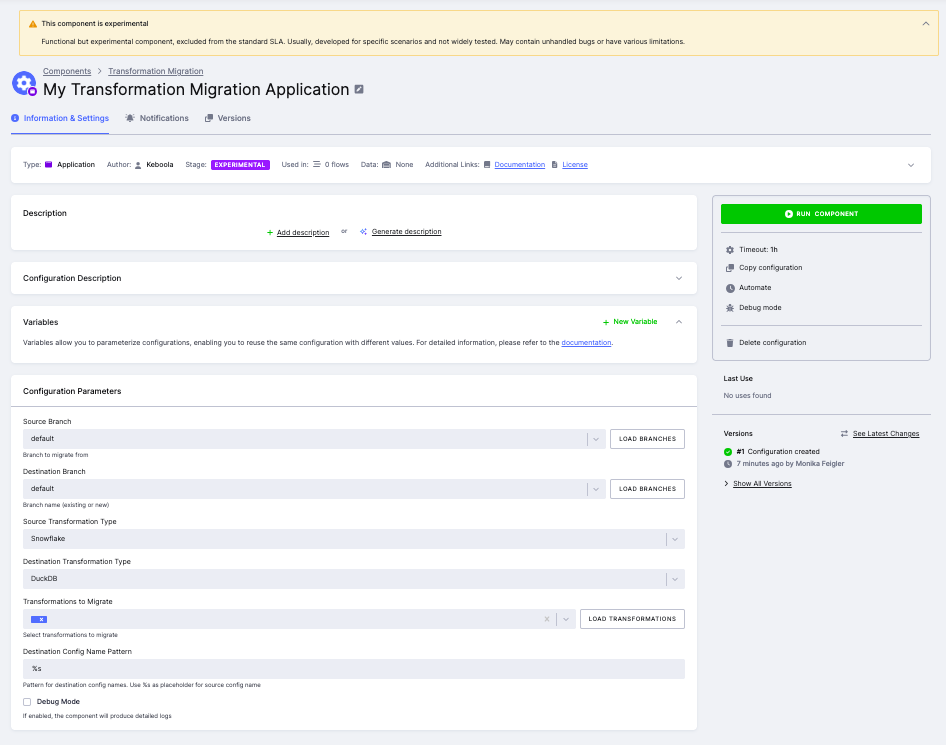
Section titled “Step 1: Create a New Configuration”In your Keboola project, go to Components and search for Transformation Migration. Create a new configuration. Set the following parameters:
- Source Branch --- select the branch containing your Snowflake transformations (default:
default). - Destination Branch --- choose an existing dev branch for the migrated configurations, or create a new one.
- Source Transformation Type --- select
Snowflake. - Destination Transformation Type --- select
DuckDB. - Destination Config Name Pattern --- use
%sas a placeholder for the original name (e.g.,%skeeps the same name,%s_duckdbappends a suffix).
Step 2: Select Transformations to Migrate
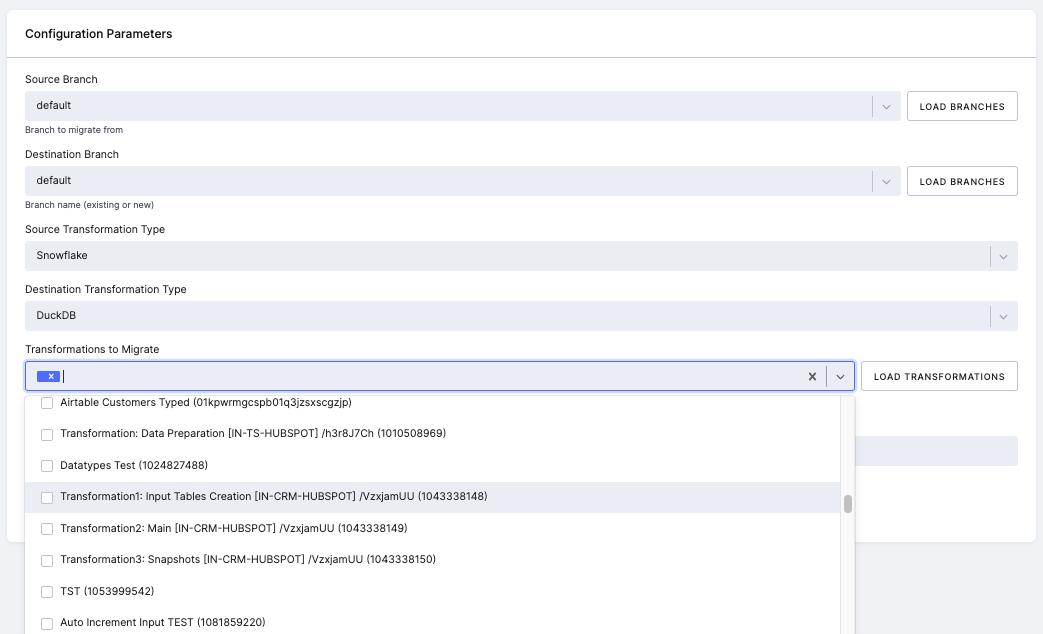
Section titled “Step 2: Select Transformations to Migrate”Click Load Transformations to populate the list of available Snowflake transformations. Select one or more transformations you want to migrate to DuckDB.
Step 3: Save and Run
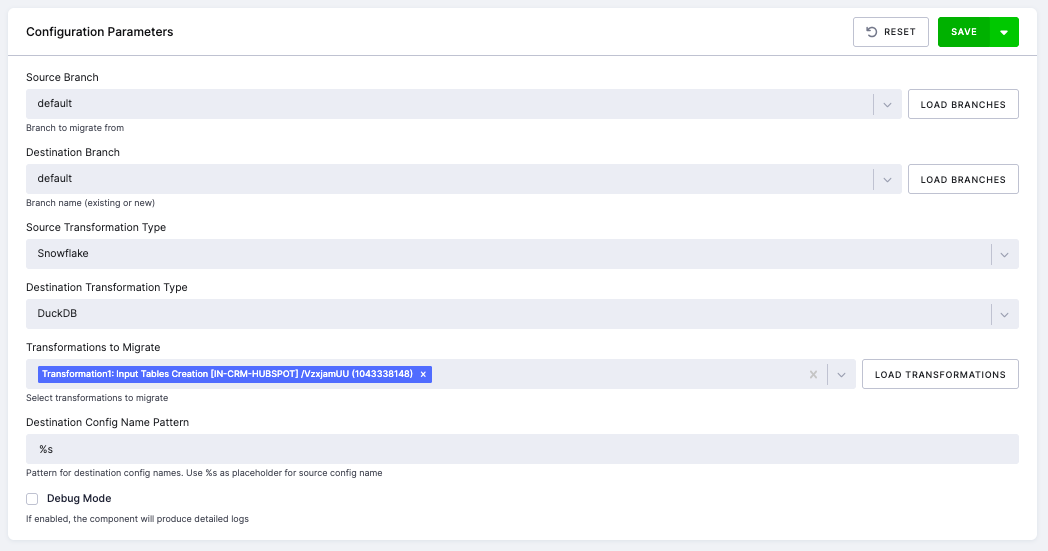
Section titled “Step 3: Save and Run”After selecting the transformations, click Save and then Run Component.
Step 4: Review the Job
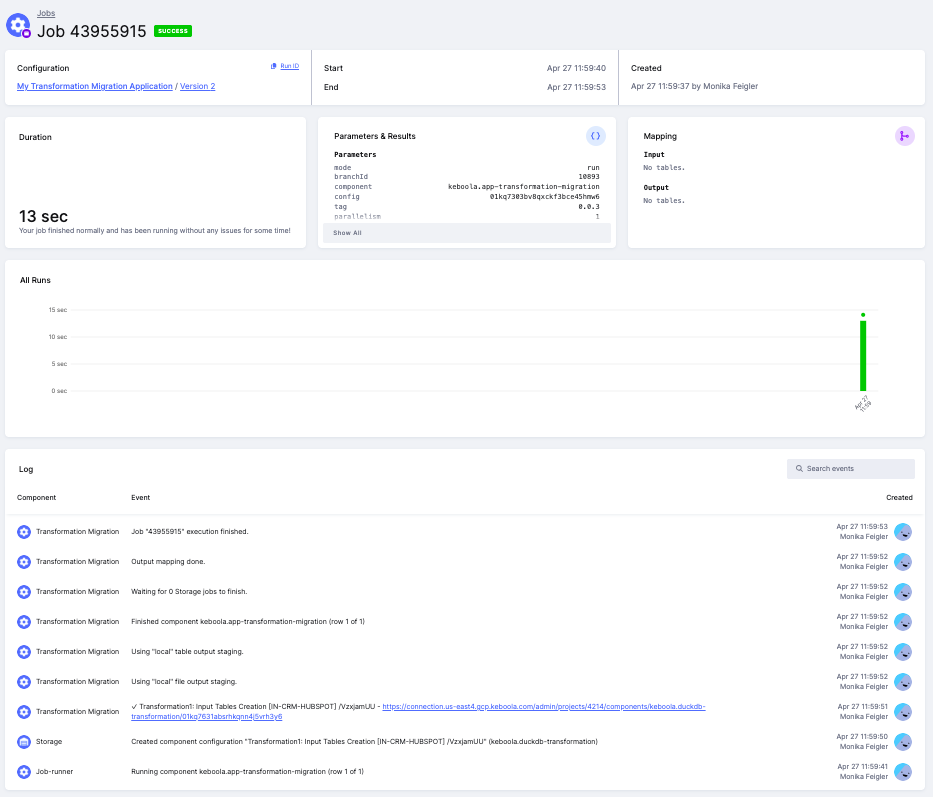
Section titled “Step 4: Review the Job”Once the job completes, review the migration summary in the job detail. The logs show which transformations were migrated successfully and provide links to the newly created DuckDB configurations.
Step 5: Review and Adjust the Migrated Configuration
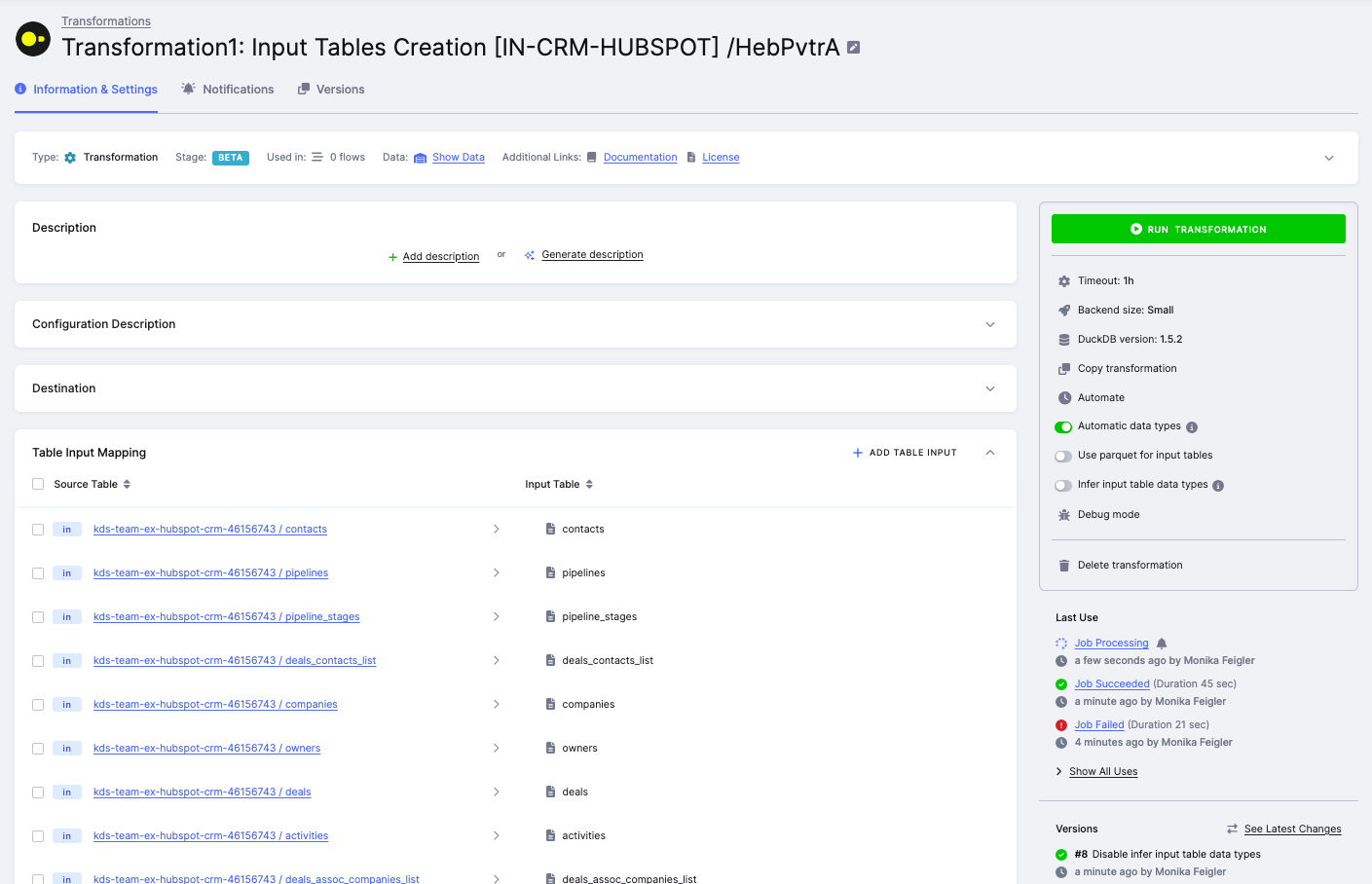
Section titled “Step 5: Review and Adjust the Migrated Configuration”Open the newly created DuckDB transformation. The component preserves all input/output table mappings and runtime settings. Review the SQL code carefully --- some queries may need manual adjustments due to syntax differences between Snowflake and DuckDB (see the sections below for common differences).
What the Component Does
Section titled “What the Component Does”- Uses SQLGlot to automatically translate SQL code blocks from Snowflake to DuckDB dialect.
- Preserves all input/output table mappings and runtime settings (backend size, etc.).
- If SQL translation fails for any code block, the original Snowflake SQL is preserved as comments in the DuckDB configuration, and an error is reported at the end of the migration.
Limitations
Section titled “Limitations”- The automatic SQL translation is not perfect. Complex queries, Snowflake-specific functions, and edge cases in data types may not be converted correctly.
- Roughly 25% of migrated transformations will need some manual fixes --- typically related to case sensitivity, unsupported functions, or data type differences.
- The component is experimental and may contain unhandled bugs or have various limitations.
- Always test the migrated transformations on a dev branch before deploying to production.
Identifier Case Sensitivity
Section titled “Identifier Case Sensitivity”This is one of the most critical differences when migrating.
Snowflake
Section titled “Snowflake”- Unquoted identifiers are converted to uppercase (
MyTablebecomesMYTABLE). - Quoted identifiers are case-sensitive (
"MyTable"and"MYTABLE"are different tables).
DuckDB table names
Section titled “DuckDB table names”- Unquoted table names are converted to lowercase (
MyTablebecomesmytable). - Quoted table names are case-sensitive (
"MyTable"references exactlyMyTable).
DuckDB column names
Section titled “DuckDB column names”- Columns are always case-sensitive regardless of quoting (
SELECT columnNameandSELECT ColumnNamerefer to different columns).
Migration tip: Use consistent lowercase naming in DuckDB:
-- Recommended: use lowercase namesCREATE TABLE mytable AS SELECT ...;Data Type Mapping
Section titled “Data Type Mapping”| Snowflake | DuckDB | Notes |
|---|---|---|
VARIANT | JSON or VARCHAR | Semi-structured data |
ARRAY | LIST | Native arrays |
OBJECT | STRUCT or JSON | Nested objects |
INTEGER | INTEGER | Same |
VARCHAR | VARCHAR | Same |
TIMESTAMP | TIMESTAMP | Same |
FLOAT | FLOAT | Same |
BOOLEAN | BOOLEAN | Same |
DATE | DATE | Same |
SQL Function Differences
Section titled “SQL Function Differences”Window Functions
Section titled “Window Functions”Snowflake supports the QUALIFY clause for filtering window function results. DuckDB does not support QUALIFY;
use a subquery with WHERE instead.
-- SnowflakeSELECT * FROM ordersQUALIFY ROW_NUMBER() OVER (PARTITION BY customer_id ORDER BY order_date DESC) = 1;
-- DuckDBSELECT * FROM (    SELECT *, ROW_NUMBER() OVER (PARTITION BY customer_id ORDER BY order_date DESC) AS rn    FROM orders) WHERE rn = 1;
Null Handling
Section titled “Null Handling”-- SnowflakeSELECT NVL(column_a, 'default') FROM my_table;
-- DuckDBSELECT COALESCE(column_a, 'default') FROM my_table;Conditional Expressions
Section titled “Conditional Expressions”-- SnowflakeSELECT IFF(status = 'active', 'yes', 'no') FROM users;
-- DuckDBSELECT CASE WHEN status = 'active' THEN 'yes' ELSE 'no' END FROM users;Date Arithmetic
Section titled “Date Arithmetic”-- SnowflakeSELECT DATEADD(day, 7, order_date) FROM orders;
-- DuckDBSELECT order_date + INTERVAL '7 days' FROM orders;-- SnowflakeSELECT DATEDIFF(day, start_date, end_date) FROM projects;
-- DuckDBSELECT date_diff('day', start_date, end_date) FROM projects;String Aggregation
Section titled “String Aggregation”-- SnowflakeSELECT department, LISTAGG(employee_name, ', ') WITHIN GROUP (ORDER BY employee_name)FROM employees GROUP BY department;
-- DuckDBSELECT department, STRING_AGG(employee_name, ', ')FROM employees GROUP BY department;Functions That Work the Same
Section titled “Functions That Work the Same”The following functions have the same syntax in both Snowflake and DuckDB:
SUBSTRING(str, start, len)POSITION('x' IN str)CONCAT(a, b)--- both handleNULLgracefullya || b--- both returnNULLif any input isNULLLIMIT nFETCH FIRST n ROWSCOALESCE(a, b, c)CAST(value AS type)
CREATE TABLE Syntax
Section titled “CREATE TABLE Syntax”Same in both:
-- Basic table creationCREATE TABLE customers (id INT, name VARCHAR);
-- Primary keysCREATE TABLE customers (id INT PRIMARY KEY, name VARCHAR);
-- Temporary tablesCREATE TEMP TABLE temp_data (id INT);CREATE TEMPORARY TABLE temp_data (id INT);
-- CREATE TABLE AS SELECT (CTAS)CREATE TABLE new_table AS SELECT * FROM old_table;
-- CREATE OR REPLACECREATE OR REPLACE TABLE customers AS SELECT * FROM source;
-- IF NOT EXISTSCREATE TABLE IF NOT EXISTS customers (id INT);
Key differences:
Transient Tables
Section titled “Transient Tables”-- Snowflake only --- not supported in DuckDBCREATE TRANSIENT TABLE staging_data (id INT, value VARCHAR);DuckDB does not have a TRANSIENT keyword. Use regular or TEMP tables instead.
Temporary Table Schemas
Section titled “Temporary Table Schemas”- Snowflake: Temporary tables can be created in any schema.
- DuckDB: Temporary tables are always in the
temp.mainschema (you cannot specify a different schema). - Both: Temporary tables are automatically dropped at the end of the session.
Name Collisions
Section titled “Name Collisions”In DuckDB, a temporary table can have the same name as a regular table. The temporary table takes priority.
To access the regular table explicitly, use its fully qualified name: memory.main.table_name.
Summary of Common Replacements
Section titled “Summary of Common Replacements”| Category | Snowflake | DuckDB |
|---|---|---|
| Window functions | QUALIFY | ROW_NUMBER() + WHERE |
| Null handling | NVL(a, b) | COALESCE(a, b) |
| Conditionals | IFF(cond, a, b) | CASE WHEN cond THEN a ELSE b END |
| Date math | DATEADD(unit, n, date) | date + INTERVAL 'n unit' |
| Date diff | DATEDIFF(unit, d1, d2) | date_diff('unit', d1, d2) |
| String aggregation | LISTAGG(...) WITHIN GROUP | STRING_AGG(...) |
| Temp tables | CREATE TEMPORARY TABLE | CREATE TEMP TABLE (same) |
| Transient tables | CREATE TRANSIENT TABLE | Not supported |
Migration Tips
Section titled “Migration Tips”- Start with SQLGlot --- it handles most syntax conversions automatically.
- Watch out for case sensitivity --- Snowflake defaults to uppercase, DuckDB to lowercase.
- Test queries incrementally --- migrate one block at a time and verify results.
- Use Kai AI assistant --- it can help identify and fix syntax differences.
- Check column aliases --- DuckDB handles column aliases differently than Snowflake in some contexts.
GROUP BY ALLcan help resolve alias-related issues. - Verify aggregate functions --- if your input tables are non-typed, enable Infer input table data types or add explicit
CAST()calls to avoid type errors with functions likeSUM()orAVG().
DuckDB Snowflake Extension
Section titled “DuckDB Snowflake Extension”For local development, DuckDB provides a Snowflake extension that lets you attach data from Snowflake and work with it using DuckDB syntax. This can be useful for testing migration queries locally before deploying them in Keboola.