

Customer IO
The Customer IO data source connector uses the Customer IO Beta API to extract customers, campaigns, segments, and activities from your Customer.io account.
Get API Key
Section titled “Get API Key”To use this connector, you need a bearer token, known as an App API Key from Customer.io. You can generate a key with a defined scope in your account settings. Learn more about bearer authorization in Customer.io.
Configuration
Section titled “Configuration”Create a new configuration of the Customer IO connector.
Then insert the API key you obtained from Customer.io.
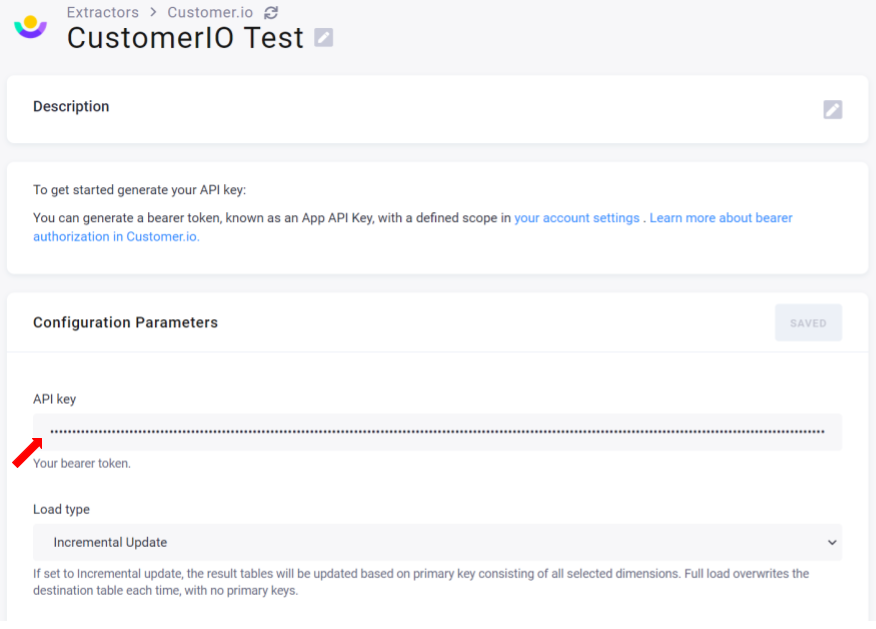
Continue configuring other parameters. Once finished, don’t forget to save everything.
Load Type
Section titled “Load Type”Select one of the following two load types:
Incremental Update— updates the result tables based on the primary key consisting of all selected dimensions.Full Load— overwrites the destination table each time, with no primary keys.
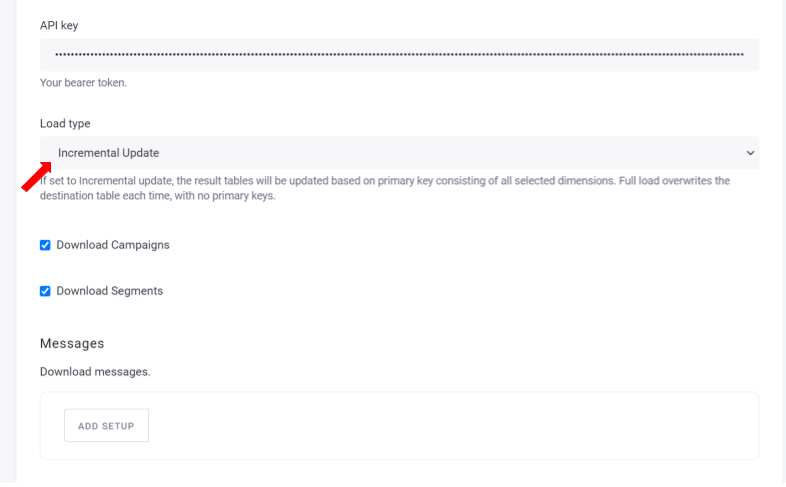
Continue by selecting what data you want to download.
Campaigns
Section titled “Campaigns”A campaign is a workflow that people in an audience trigger and traverse. Note that the JSON and Array objects
in the actions and tags columns are represented as text.
Columns:
| column | example |
|---|---|
| actions | [{‘id’: 3, ‘type’: ‘email’}, {‘id’: 7, ‘type’: ‘email’}] |
| active | FALSE |
| created | 1591294006 |
| created_by | Leos |
| customer_id | 123x |
| date_attribute | |
| deduplicate_id | 123123:29:00 |
| first_started | 0 |
| frequency | |
| id | 1 |
| name | Onboarding Campaign |
| start_hour | |
| start_minutes | |
| state | draft |
| tags | [‘Sample’] |
| timezone |
Segments
Section titled “Segments”Segments are groups of people, subsets of your audience. You get information about segments and the customers contained by a segment.
Example output:
| deduplicate_id | description | id | name | progress | state | tags | type |
|---|---|---|---|---|---|---|---|
| 26521567:45:00 | Includes all people | 1 | Signed up | finished | dynamic | ||
| 26582936:15:00 | Anyone associated with active customer account. | 13 | Active Customers | finished | dynamic |
Next, select the messages, customers, and/or activities that you wish to download.
Messages
Section titled “Messages”This table contains metadata about messages. You may filter the messages by their type: email, webhook, twilio,
urban_airship, slack, push.
Learn more.
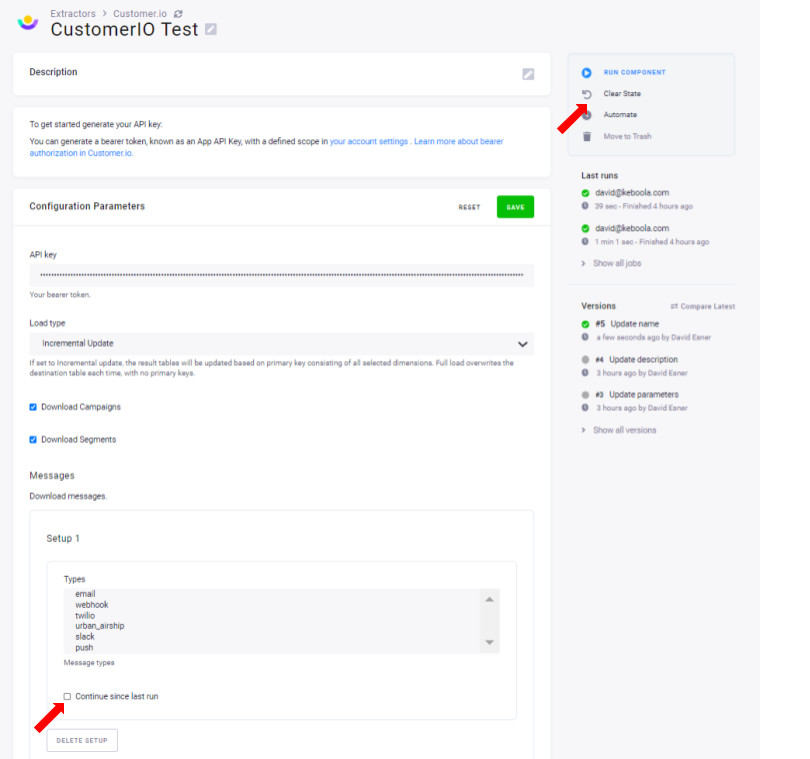
You can select the Continue since last run option. When checked, only those messages that appeared since the last run will be downloaded.
To backfill without changing this attribute, click the Reset State button.
Customers
Section titled “Customers”When downloading customers, you can filter them using JSON. You can also select only the attributes you want to see.
Filter
Section titled “Filter”An additional filter condition in JSON format. The filter language is defined here. If left empty, all users are downloaded.
Example values:
Find the first 2 customers in segment 7 and segment 5=>:{"and":[{"segment":{"id":7}},{"segment":{"id":5}}]}Find the first 10 unsubscribed customers=>:{"attribute":{"field":"unsubscribed","operator":"eq","value":"true"}}}
Attributes
Section titled “Attributes”A comma-separated list of required customer attributes. Each customer may have a different set of columns. This is to limit only to attributes you need. All attributes are downloaded if left empty.
Activities
Section titled “Activities”Activities are cards in campaigns, broadcasts, etc. They might be messages, webhooks, attribute changes, etc. You can select the activity types you are interested in. Also, there are two modes of result parsing available to choose from. When done, remember to save your configuration before you run it.
Result parsing
Section titled “Result parsing”Each activity type may have different columns and table structure. For this reason, the data source connector allows fetching data
in two modes: PARSED_DATA and SINGLE_TABLE.
PARSED_DATAwill generate structured table for each activity type. E.g., the typeeventwill generate the tableactivity_event:
| customer_id | data_description | data_project | data_start | id | name | timestamp | type |
|---|---|---|---|---|---|---|---|
| David | test | 1234d | inactive project | 1609808524 | event | ||
| Tom | test2 | 2020-10-19T11:18:55Z | 3467g | enroll | 1603120800 | event | |
| Carl | desc | TS_Test | 667676h | credit grant | 1616382356 | event |
SINGLE_TABLEwill populate single activities_all table with data unparsed as column. The data will be present in adatafolder as a JSON string.
Example:
| customer_id | data | delivery_id | delivery_type | id | timestamp | type |
|---|---|---|---|---|---|---|
| David | {‘daysofinactivity’: 76, ‘lastactivitydate’: ‘2020-10-21’, ‘project’: ‘test’, ‘projecturl’: ‘example.com’} | 1234d | 1609808524 | event | ||
| Tom | {‘project’: ‘test2’, ‘start’: ‘2020-10-19T11:18:55Z’} | 01EN0Q4 | 1603120800 | event |